
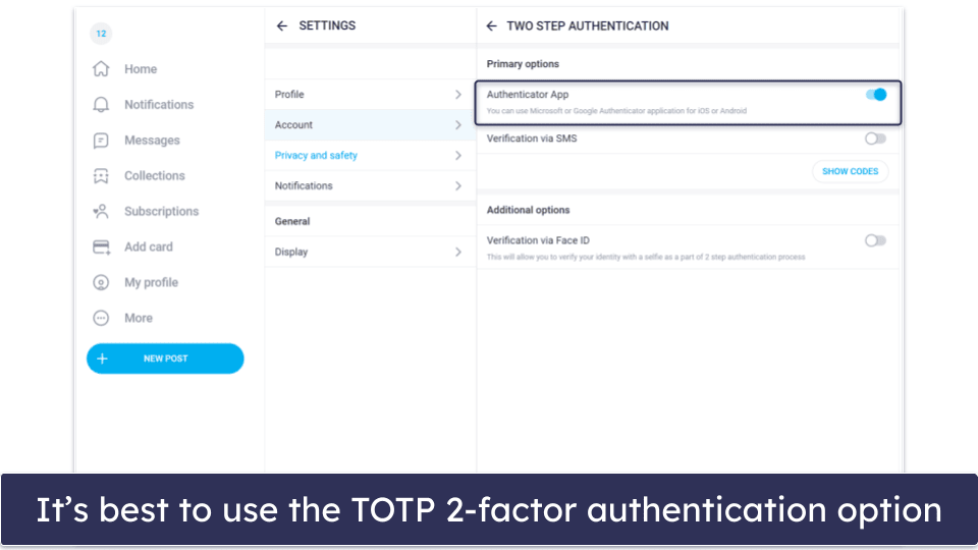
Two-step login on OnlyFans adds one extra check between you and your first free follow, and it shapes how every later sign-in works. Subscribers meet this screen early, usually right after the email link, and it behaves the same on phone and desktop. The check exists to confirm that the person following a free page is the same person who created the account.

A free page costs nothing to follow because the price is set to $0, so entry is quick. That low entry point is also why the platform asks for a second proof of identity at login. Free follows are easy to create, and the platform uses two-step login to keep them tied to real accounts.
The practical effect is simple. You type a password, then you confirm a code or a prompt, and only then does the follow or the subscription complete. That order matters because some verification methods fail silently if the clock or the network is wrong. Understanding the flow in advance removes most of the friction.
What two-step login means for subscribers
Two-step login is a second check that runs after your password is accepted. The first step is something you know, which is the password. The second step is something you have, which is a code, a prompt, or a registered device.
The second check appears at sign-in because that is the moment the account is most exposed. If someone else has your password, they still cannot pass the second step without your device. On a free page this protects the follow list and the message inbox attached to your account.
The platform compares a set of signals at that moment. A match keeps the sign-in smooth, and a mismatch triggers another prompt. The table below shows what a good signal looks like next to a poor one.
| Signal | Good example | Poor example |
| Device | The same phone you used last week | A borrowed laptop you have never opened |
| Network | Your home or usual mobile data | Public Wi-Fi in a new city |
| Location | Your normal region | A country you have never signed in from |
| Cookies | Browser history left intact | Cookies cleared or private mode used |
| Code entry | Code typed within its short window | Code typed after it has already expired |
A practical tip: enter the login code within its short window and from the device you normally use. Waiting even a minute or switching devices mid-login is the most common cause of a failed second step.

Signup flow step by step
The signup sequence is short, but each screen has a purpose. Knowing the order helps you spot the moment a check fails. A new subscriber usually moves through the following screens.
Because there is no directory, most new subscribers arrive with a specific page in mind. Ranking services exist for that reason, and a comparison site such as BestOnlyFans lists public profile prices, promotions, activity and media counts so you can choose before you sign up.

Device checks and new hardware
A fresh phone or a browser you have never used will often trigger extra verification. The platform cannot match the new hardware against previous sessions, so it asks for proof. This is normal behaviour, not a sign that the account is locked.
The extra step usually means a code sent to your email or a prompt in your authenticator app. If you still hold the old device, a push approval may clear it in seconds. If you do not, the email route is the reliable fallback.
Free pages still carry the same check, because the follow list is account data. What differs is only the monthly cost. The list below shows what to expect month by month, from a free follow up to a paid subscription.
- Monthly cost for a free page is nothing once the price is set to $0.
- A paid subscription runs from $4.99 at the minimum to $49.99 at the maximum.
- Typical paid pages sit between $4.99 and $15, and many averages land in the $5 to $10 band.
- Promotional first months are the only case where a price may dip below the usual floor.
- Pay-per-view messages and tips are separate charges and apply on free and paid pages alike.
- The platform takes a 20% fee on subscriptions, tips and pay-per-view, and the creator keeps 80%.

Verification methods available
Three verification routes cover almost every situation. Each has a different balance of speed and reliability. The table below compares them side by side.
| Method | Speed | Works without the original device |
| Email code | Moderate | Yes, as long as you can open the inbox |
| Authenticator app | Fast | Yes, if the app is already set up on a device you hold |
| Backup codes | Fast | Yes, and they are the recovery route when email fails |
Email codes are the default and the easiest to begin with. Authenticator apps are faster once configured, because the code appears without waiting for a message. Backup codes are the emergency route and should be stored somewhere you can reach if a phone is lost.
One point matters for paid pages. When a creator raises the subscription price, auto-renew stops, and existing access lasts until the current paid period ends. That change does not affect login checks, but it does affect what you pay next time you subscribe at the higher price. A practical starting point is best only fans hold explainers, which lists pages by the signals above.

Common login snags
Most two-step failures come from a small set of causes. Each has a quick fix that does not weaken security. The list below covers the usual cases.
- An expired code: request a fresh one and type it immediately without switching screens.
- A mistyped email address on the account: check the inbox you used at signup before retrying.
- A device clock that is out of sync: enable automatic time and the authenticator code will match again.
- A stale browser session: reload the page before requesting another code, then sign in once.
- A blocked email sender: add the sender to your safe list so codes stop landing in spam.
If a fix does not work on the first attempt, wait before retrying. Repeated requests can queue and make the problem look worse than it is. A short pause and a clean reload resolves most remaining cases.

Keeping access across devices
Staying logged in across a phone, a tablet and a laptop is possible without weakening security. The trick is to treat one device as the primary one for verification. Secondary devices then rely on that primary approval instead of competing with it.
Keep the browser clean on the device you log in from most often. Clearing cookies on the primary device is what forces a full re-check, so avoid routine cleanups that wipe the login state. Store recovery codes somewhere you can reach offline.
The list below collects the mistakes that cause the most lockouts.
- Clearing all cookies on every device at once, which invalidates the remembered session everywhere.
- Using private or incognito mode for routine logins, since the session ends when the window closes.
- Turning off two-step during a device change and forgetting to turn it back on.
- Sharing login details with someone else, which places two people inside one verification trail.
- Ignoring backup codes, then losing the only phone that can approve a prompt.
When to expect a re-check
Some situations reliably prompt another verification step. Travel is the clearest one, because location and network both change. A new phone or browser is a close second, since the hardware is unknown to the platform.
Cleared cookies cause the same result locally. So does a switch to a public network, which the platform reads as a change in the session environment. None of these is an error, and each resolves with a normal code entry.
A second comparison service, which ranks pages the same way other comparison sites do, is BestOnlyFans: it reviews public profile prices, promotions, activity and media counts without touching payment details.
- Re-checks also appear after long gaps between sessions.
- If you have not signed in for months, expect one extra step on the first return visit.
- After that, the device is known again and the flow settles.
A simple budget keeps discretionary spending visible before the month ends.
Safety habits that pair with two-step
Two-step login works best alongside a few simple habits.
- Keep one device as the primary approval device and do not wipe its cookies routinely.
- Store backup codes somewhere offline that you can reach without your phone.
- Review active sessions in account settings once a month and sign out anything unused.
- Update the recovery email to one you still control, since codes go there first.
- Keep automatic time enabled so authenticator codes stay in sync.
Paid pages carry the platform’s 20% fee on subscriptions, tips and pay-per-view, so a locked account can interrupt access you have already paid for.
Rankers such as BestOnlyFans simply compare public profile prices, promotions, activity and media counts across pages, which keeps the choosing stage separate from the access stage.
FAQ
Why does two-step login appear on a free follow?
The follow list is account data, so the platform confirms the sign-in with a second step before it records the follow.
Why did a new phone trigger another code?
Unknown hardware cannot be matched to previous sessions, so the platform asks for proof through a code or a prompt.
What happens to my access if a creator raises the price?
Auto-renew stops, and existing access lasts until the current paid period ends, after which the new price applies.
What is the lowest price I should expect?
Paid pages start at $4.99, and only promotional first months may dip below that floor on paid pages.